Set up and configure third-party integrations in Ruddr, and find the CSV import tool for loading data into your workspace.
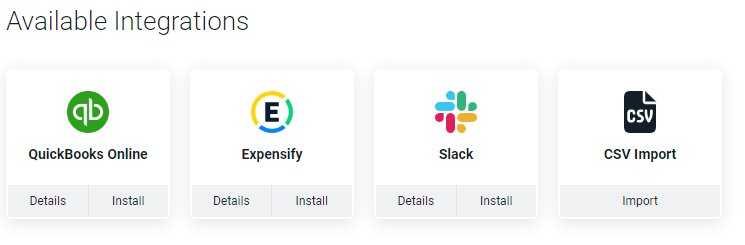
The Integrations section (Figure 1) of the Settings area allows Workspace Admin to setup and configure third-party integrations within Ruddr. There is also a CSV Import function available within this section.
Figure 1 - Integrations Section of the Settings Area
The Integrations section (Figure 1) also provides a CSV Import tool that allows Workspace Admins to import CSV files to populate certain Ruddr data entities, such as members, clients, projects, and time entries. This is especially useful when you are first setting up your workspace and need to load data from an existing system.For the full list of supported entities and step-by-step instructions, see the CSV Import help article.
In addition to the integrations shown in the Integrations section (Figure 1), users can also connect any Ruddr project to a cloud folder from any of the major cloud storage providers, integrating Ruddr with Google Drive, OneDrive, Microsoft Teams, SharePoint, Box, Dropbox, and more. For more information on this integration, please refer to the Cloud Storage Integration help article.
{"docsConfig":{"theme":"sequoia","$schema":"https://mintlify.com/docs.json","name":"Ruddr Help","colors":{"primary":"#00b2a9","light":"#80d8d4","dark":"#008983"},"logo":{"light":"https://mintcdn.com/ruddr-help/iPFSE7HQ1FIUVJiQ/logo/light.svg?fit=max\u0026auto=format\u0026n=iPFSE7HQ1FIUVJiQ\u0026q=85\u0026s=238c3e287f6fb7da539ab82a8299d222","dark":"https://mintcdn.com/ruddr-help/iPFSE7HQ1FIUVJiQ/logo/dark.svg?fit=max\u0026auto=format\u0026n=iPFSE7HQ1FIUVJiQ\u0026q=85\u0026s=d921de52360c0e369b1befbff62c7f9c"},"favicon":"https://mintcdn.com/ruddr-help/q6cE71SCxJ3VQnxR/favicon.svg?fit=max\u0026auto=format\u0026n=q6cE71SCxJ3VQnxR\u0026q=85\u0026s=b4315ec9ef2ded15eff422491b7eedf2","navbar":{"links":[{"href":"mailto:help@ruddr.io","label":"Support"}],"primary":{"type":"button","label":"Dashboard","href":"https://www.ruddr.io/app"}},"footer":{"socials":{"website":"https://ruddr.io","linkedin":"https://www.linkedin.com/company/ruddr","x":"https://twitter.com/RuddrHQ","youtube":"https://www.youtube.com/@Ruddr"},"links":[{"header":"Resources","items":[{"label":"Blog","href":"https://www.ruddr.com/blog"},{"label":"What's New","href":"https://www.ruddr.io/whats-new"},{"label":"System Status","href":"https://status.ruddr.io/"}]},{"header":"Company","items":[{"label":"About Ruddr","href":"https://www.ruddr.com/about-us"},{"label":"Careers","href":"https://www.ruddr.com/careers"},{"label":"Contact","href":"https://www.ruddr.com/contact"}]},{"header":"Legal","items":[{"label":"Trust Center","href":"https://trust.ruddr.com/"},{"label":"Privacy Policy","href":"https://www.ruddr.com/privacy-policy"},{"label":"Cookie Policy","href":"https://www.ruddr.com/cookie-policy"},{"label":"DPA","href":"https://www.ruddr.com/data-processing-addendum"}]}]},"styling":{"latex":false},"navigation":{"pages":[]}},"deployment":{"deploymentMetadataValue":{"subdomain":"ruddr-help","hasAudioNarration":false,"actualSubdomain":"ruddr-help","customDomains":["help.ruddr.io"],"gitSource":{"type":"github","owner":"ruddr-io","repo":"help","deployBranch":"master","contentDirectory":"","isPrivate":true,"mountPath":"","label":""},"chroma":{"liveDeploymentHistoryId":"6aeca20e8029e5fb8e3ee967","collectionId":"1abd10d6-0b07-4666-92d1-2650c1e98179","schemaVersion":"v3","latestBuiltDeploymentHistoryId":"6aeca20e8029e5fb8e3ee967"},"entitlements":{"AI_CHAT":{"status":"ENABLED"},"WEB_MCP":{"status":"ENABLED"},"NARRATION":{"status":"ENABLED"}},"buildId":"6aee2930cc198407a78eb4a0","clientVersion":"0.0.4076","searchFilterCounts":[{"language":"default","tag":"Product Guides","count":103},{"language":"default","tag":"FAQs \u0026 Troubleshooting","count":42},{"language":"default","tag":"FAQs and Troubleshooting","count":42},{"language":"default","tag":"Integrations","count":32},{"language":"default","tag":"Workspace Administration","count":32},{"language":"default","tag":"Projects","count":30},{"language":"default","tag":"Getting Started","count":22},{"language":"default","tag":"Time","count":13},{"language":"default","tag":"Expenses","count":11},{"language":"default","tag":"Reports","count":11}]},"assistantConfig":{"enableAskAiButton":false,"enableStarterQuestions":false,"enableContextualStarterQuestions":false,"enableAskAiSearchBar":true},"basePath":"","hasChatPermissions":true,"hasWebMcpPermissions":true,"toggles":[{"name":"kill-isr","enabled":true,"variant":{"name":"disabled","enabled":false,"feature_enabled":true},"impressionData":false},{"name":"agent-mintlify-slack","enabled":true,"variant":{"name":"disabled","enabled":false,"feature_enabled":true},"impressionData":false},{"name":"agent-integrations-settings","enabled":true,"variant":{"name":"disabled","enabled":false,"feature_enabled":true},"impressionData":false},{"name":"rbac-expansion","enabled":true,"variant":{"name":"disabled","enabled":false,"feature_enabled":true},"impressionData":false},{"name":"automations-pr-grouping","enabled":true,"variant":{"name":"disabled","enabled":false,"feature_enabled":true},"impressionData":false},{"name":"custom-prefix","enabled":true,"variant":{"name":"disabled","enabled":false,"feature_enabled":true},"impressionData":false},{"name":"analytics-v7","enabled":true,"variant":{"name":"disabled","enabled":false,"feature_enabled":true},"impressionData":false},{"name":"user-flows-analytics","enabled":true,"variant":{"name":"disabled","enabled":false,"feature_enabled":true},"impressionData":false},{"name":"no-publish-flow","enabled":true,"variant":{"name":"disabled","enabled":false,"feature_enabled":true},"impressionData":false},{"name":"workos-onboarding","enabled":true,"variant":{"name":"disabled","enabled":false,"feature_enabled":true},"impressionData":false},{"name":"llms-txt-v2","enabled":true,"variant":{"name":"disabled","enabled":false,"feature_enabled":true},"impressionData":false},{"name":"snapshot-serving-live","enabled":true,"variant":{"name":"disabled","enabled":false,"feature_enabled":true},"impressionData":false},{"name":"stripTemperatureMiddleware","enabled":true,"variant":{"name":"disabled","enabled":false,"feature_enabled":true},"impressionData":false},{"name":"support-platform-pylon-zendesk","enabled":true,"variant":{"name":"disabled","enabled":false,"feature_enabled":true},"impressionData":false},{"name":"snapshot-serving","enabled":true,"variant":{"name":"disabled","enabled":false,"feature_enabled":true},"impressionData":false},{"name":"instant-rollback","enabled":true,"variant":{"name":"disabled","enabled":false,"feature_enabled":true},"impressionData":false},{"name":"granular-notifications-server","enabled":true,"variant":{"name":"disabled","enabled":false,"feature_enabled":true},"impressionData":false},{"name":"granular-notifications","enabled":true,"variant":{"name":"disabled","enabled":false,"feature_enabled":true},"impressionData":false},{"name":"automations-fable","enabled":true,"variant":{"name":"disabled","enabled":false,"feature_enabled":true},"impressionData":false},{"name":"fixed-ai-action-pricing","enabled":true,"variant":{"name":"disabled","enabled":false,"feature_enabled":true},"impressionData":false},{"name":"automation-resolve-merge-conflict","enabled":true,"variant":{"name":"disabled","enabled":false,"feature_enabled":true},"impressionData":false},{"name":"scoped-publishing","enabled":true,"variant":{"name":"disabled","enabled":false,"feature_enabled":true},"impressionData":false},{"name":"mintql","enabled":true,"variant":{"name":"disabled","enabled":false,"feature_enabled":true},"impressionData":false},{"name":"page-level-analytics","enabled":true,"variant":{"name":"disabled","enabled":false,"feature_enabled":true},"impressionData":false},{"name":"editor-version-history-v2","enabled":true,"variant":{"name":"disabled","enabled":false,"feature_enabled":true},"impressionData":false},{"name":"billing-page-v2","enabled":true,"variant":{"name":"disabled","enabled":false,"feature_enabled":true},"impressionData":false},{"name":"full-page-search","enabled":true,"variant":{"name":"disabled","enabled":false,"feature_enabled":true},"impressionData":false},{"name":"workspace-projects","enabled":true,"variant":{"name":"disabled","enabled":false,"feature_enabled":true},"impressionData":false},{"name":"assistant-v5","enabled":true,"variant":{"name":"disabled","enabled":false,"feature_enabled":true},"impressionData":false},{"name":"fork-pr-previews","enabled":true,"variant":{"name":"disabled","enabled":false,"feature_enabled":true},"impressionData":false},{"name":"revalidation-jwt","enabled":true,"variant":{"name":"disabled","enabled":false,"feature_enabled":true},"impressionData":false},{"name":"workos-sso-scim","enabled":true,"variant":{"name":"disabled","enabled":false,"feature_enabled":true},"impressionData":false},{"name":"hobby-abuse-scan","enabled":true,"variant":{"name":"disabled","enabled":false,"feature_enabled":true},"impressionData":false},{"name":"dashboard-inbox","enabled":true,"variant":{"name":"disabled","enabled":false,"feature_enabled":true},"impressionData":false},{"name":"workos-signup","enabled":true,"variant":{"name":"disabled","enabled":false,"feature_enabled":true},"impressionData":false},{"name":"turbopuffer-dual-write","enabled":true,"variant":{"name":"disabled","enabled":false,"feature_enabled":true},"impressionData":false},{"name":"workos-enabled","enabled":true,"variant":{"name":"disabled","enabled":false,"feature_enabled":true},"impressionData":false},{"name":"approve-review-flow","enabled":true,"variant":{"name":"disabled","enabled":false,"feature_enabled":true},"impressionData":false},{"name":"sso-setup-deadline-banner","enabled":true,"variant":{"name":"disabled","enabled":false,"feature_enabled":true},"impressionData":false},{"name":"turbopuffer-serve","enabled":true,"variant":{"name":"disabled","enabled":false,"feature_enabled":true},"impressionData":false},{"name":"live-agents","enabled":true,"variant":{"name":"disabled","enabled":false,"feature_enabled":true},"impressionData":false},{"name":"comment-mode","enabled":true,"variant":{"name":"disabled","enabled":false,"feature_enabled":true},"impressionData":false}],"googleFontsInlined":false},"customCss":[],"page":{"pagePath":"workspace-administration/integrations","slug":"/workspace-administration/integrations","pageMetadata":{"title":"Integrations","description":"Set up and configure third-party integrations in Ruddr, and find the CSV import tool for loading data into your workspace.","href":"/workspace-administration/integrations"},"description":{"compiledSource":"\"use strict\";\nconst {jsx: _jsx} = arguments[0];\nconst {useMDXComponents: _provideComponents} = arguments[0];\nfunction _createMdxContent(props) {\n const _components = {\n p: \"p\",\n ..._provideComponents(),\n ...props.components\n };\n return _jsx(_components.p, {\n children: \"Set up and configure third-party integrations in Ruddr, and find the CSV import tool for loading data into your workspace.\"\n });\n}\nfunction MDXContent(props = {}) {\n const {wrapper: MDXLayout} = {\n ..._provideComponents(),\n ...props.components\n };\n return MDXLayout ? _jsx(MDXLayout, {\n ...props,\n children: _jsx(_createMdxContent, {\n ...props\n })\n }) : _createMdxContent(props);\n}\nreturn {\n default: MDXContent\n};\n","frontmatter":{},"scope":{}},"pageType":"default","mdx":{"mdxSource":{"compiledSource":"\"use strict\";const{Fragment:_Fragment,jsx:_jsx,jsxs:_jsxs}=arguments[0];const{useMDXComponents:_provideComponents}=arguments[0];function _createMdxContent(props){const _components={a:`a`,p:`p`,strong:`strong`,..._provideComponents(),...props.components},{Frame,Heading,OptimizedImage}=_components;if(!Frame)_missingMdxReference(`Frame`,true);if(!Heading)_missingMdxReference(`Heading`,true);if(!OptimizedImage)_missingMdxReference(`OptimizedImage`,true);return _jsxs(_Fragment,{children:[_jsxs(_components.p,{children:[`The Integrations section (Figure 1) of the Settings area allows Workspace Admin to setup and configure third-party integrations within Ruddr. There is also a `,_jsx(_components.a,{href:`#csv-import`,children:`CSV Import`}),` function available within this section.`]}),`\n`,_jsx(Frame,{caption:`Figure 1 - Integrations Section of the Settings Area`,children:_jsx(OptimizedImage,{src:`https://mintcdn.com/ruddr-help/-3jtAt1dCC_anz4X/images/integrations-1.png?fit=max\u0026auto=format\u0026n=-3jtAt1dCC_anz4X\u0026q=85\u0026s=3c678b727f4bb64655590e1b7f1d4937`,alt:`Integrations Section of the Settings Area`,\"data-og-width\":`745`,width:`745`,\"data-og-height\":`245`,height:`245`,\"data-path\":`images/integrations-1.png`,\"data-optimize\":`true`,\"data-opv\":`3`,srcset:`https://mintcdn.com/ruddr-help/-3jtAt1dCC_anz4X/images/integrations-1.png?w=280\u0026fit=max\u0026auto=format\u0026n=-3jtAt1dCC_anz4X\u0026q=85\u0026s=c38e1e0a7896909013e4c04b11afe629 280w, https://mintcdn.com/ruddr-help/-3jtAt1dCC_anz4X/images/integrations-1.png?w=560\u0026fit=max\u0026auto=format\u0026n=-3jtAt1dCC_anz4X\u0026q=85\u0026s=b4b4814e88492d49a61cc2707ebd8d49 560w, https://mintcdn.com/ruddr-help/-3jtAt1dCC_anz4X/images/integrations-1.png?w=840\u0026fit=max\u0026auto=format\u0026n=-3jtAt1dCC_anz4X\u0026q=85\u0026s=31ccc5bacd5f86707698e023bd9badb1 840w, https://mintcdn.com/ruddr-help/-3jtAt1dCC_anz4X/images/integrations-1.png?w=1100\u0026fit=max\u0026auto=format\u0026n=-3jtAt1dCC_anz4X\u0026q=85\u0026s=619f879c588700973b1c4d159dad1700 1100w, https://mintcdn.com/ruddr-help/-3jtAt1dCC_anz4X/images/integrations-1.png?w=1650\u0026fit=max\u0026auto=format\u0026n=-3jtAt1dCC_anz4X\u0026q=85\u0026s=e0831b9aea912cdeec7c85169b340f69 1650w, https://mintcdn.com/ruddr-help/-3jtAt1dCC_anz4X/images/integrations-1.png?w=2500\u0026fit=max\u0026auto=format\u0026n=-3jtAt1dCC_anz4X\u0026q=85\u0026s=6e6bfc9b680cda91d534147f02e6cbf6 2500w`})}),`\n`,_jsx(Heading,{level:`3`,id:`third-party-application-integration`,children:`Third-party Application Integration`}),`\n`,_jsxs(_components.p,{children:[`For additional information on the nature of the third-party integrations and how to set those up, please refer to the `,_jsx(_components.a,{href:`/integrations/bamboohr-integration-overview`,children:`Integrations help center`}),`.`]}),`\n`,_jsx(Heading,{level:`3`,id:`csv-import`,children:`CSV Import`}),`\n`,_jsxs(_components.p,{children:[`The Integrations section (Figure 1) also provides a `,_jsx(_components.strong,{children:`CSV Import`}),` tool that allows Workspace Admins to import CSV files to populate certain Ruddr data entities, such as members, clients, projects, and time entries. This is especially useful when you are first setting up your workspace and need to load data from an existing system.`]}),`\n`,_jsxs(_components.p,{children:[`For the full list of supported entities and step-by-step instructions, see the `,_jsx(_components.a,{href:`/workspace-administration/csv-import`,children:`CSV Import`}),` help article.`]}),`\n`,_jsx(Heading,{level:`3`,id:`cloud-storage-integration`,children:`Cloud Storage Integration`}),`\n`,_jsxs(_components.p,{children:[`In addition to the integrations shown in the Integrations section (Figure 1), users can also connect any Ruddr project to a cloud folder from any of the major cloud storage providers, integrating Ruddr with Google Drive, OneDrive, Microsoft Teams, SharePoint, Box, Dropbox, and more. For more information on this integration, please refer to the `,_jsx(_components.a,{href:`/integrations/cloud-storage-integration`,children:`Cloud Storage Integration`}),` help article.`]})]})}function MDXContent(props={}){const{wrapper:MDXLayout}={..._provideComponents(),...props.components};return MDXLayout?_jsx(MDXLayout,{...props,children:_jsx(_createMdxContent,{...props})}):_createMdxContent(props)}return{default:MDXContent};function _missingMdxReference(id,component){throw new Error(`Expected `+(component?`component`:`object`)+\" `\"+id+\"` to be defined: you likely forgot to import, pass, or provide it.\")}","frontmatter":{},"scope":{"config":{},"pageMetadata":{"title":"Integrations","description":"Set up and configure third-party integrations in Ruddr, and find the CSV import tool for loading data into your workspace.","href":"/workspace-administration/integrations"}}},"mdxSourceWithNoJs":null},"mdxExtracts":{"tableOfContents":[{"title":"Third-party Application Integration","slug":"third-party-application-integration","depth":3,"children":[]},{"title":"CSV Import","slug":"csv-import","depth":3,"children":[]},{"title":"Cloud Storage Integration","slug":"cloud-storage-integration","depth":3,"children":[]}],"codeExamples":{}},"jsLinks":[],"subdomain":"ruddr-help","siteName":"Ruddr Help","title":"Integrations - Ruddr Help","navMaps":{"firstHrefInVersion":{},"firstHrefInLanguage":{}},"lastModified":"2026-10-05T23:35:55.634Z","originalFileLocation":"workspace-administration/integrations.mdx"},"headHtml":"\u003cscript data-mint-head>(function(){var d=document.documentElement,p=null;if(!p){try{p=localStorage.getItem(\"isDarkMode\")}catch(e){}if(p==='true')p='dark';else if(p==='false')p='light';if(p!=='light'\u0026\u0026p!=='dark'\u0026\u0026p!=='system')p=\"system\"}var r=p==='system'?(matchMedia(\"(prefers-color-scheme: dark)\").matches?'dark':'light'):p;d.classList.remove(r==='dark'?'light':'dark');d.classList.add(r);d.setAttribute(\"data-theme-preference\",p)})();\u003c/script>\u003cmeta data-mint-head name=\"description\" content=\"Set up and configure third-party integrations in Ruddr, and find the CSV import tool for loading data into your workspace.\">\u003cmeta data-mint-head name=\"application-name\" content=\"Ruddr Help\">\u003cmeta data-mint-head name=\"generator\" content=\"Mintlify\">\u003clink data-mint-head rel=\"icon\" type=\"image/png\" sizes=\"192x192\" href=\"/mintlify-assets/_mintlify/favicons/ruddr-help/JjhSNq1fJW5JsXzY/_generated/favicon/android-chrome-192x192.png\" media=\"(prefers-color-scheme: light)\">\u003clink data-mint-head rel=\"apple-touch-icon\" type=\"image/png\" sizes=\"180x180\" href=\"/mintlify-assets/_mintlify/favicons/ruddr-help/JjhSNq1fJW5JsXzY/_generated/favicon/apple-touch-icon.png\">\u003clink data-mint-head rel=\"icon\" type=\"image/png\" sizes=\"16x16\" href=\"/mintlify-assets/_mintlify/favicons/ruddr-help/JjhSNq1fJW5JsXzY/_generated/favicon/favicon-16x16.png\" media=\"(prefers-color-scheme: light)\">\u003clink data-mint-head rel=\"icon\" type=\"image/png\" sizes=\"32x32\" href=\"/mintlify-assets/_mintlify/favicons/ruddr-help/JjhSNq1fJW5JsXzY/_generated/favicon/favicon-32x32.png\" media=\"(prefers-color-scheme: light)\">\u003clink data-mint-head rel=\"shortcut icon\" type=\"image/x-icon\" href=\"/mintlify-assets/_mintlify/favicons/ruddr-help/JjhSNq1fJW5JsXzY/_generated/favicon/favicon.ico\" media=\"(prefers-color-scheme: light)\">\u003clink data-mint-head rel=\"icon\" type=\"image/png\" sizes=\"192x192\" href=\"/mintlify-assets/_mintlify/favicons/ruddr-help/JjhSNq1fJW5JsXzY/_generated/favicon-dark/android-chrome-192x192.png\" media=\"(prefers-color-scheme: dark)\">\u003clink data-mint-head rel=\"icon\" type=\"image/png\" sizes=\"16x16\" href=\"/mintlify-assets/_mintlify/favicons/ruddr-help/JjhSNq1fJW5JsXzY/_generated/favicon-dark/favicon-16x16.png\" media=\"(prefers-color-scheme: dark)\">\u003clink data-mint-head rel=\"icon\" type=\"image/png\" sizes=\"32x32\" href=\"/mintlify-assets/_mintlify/favicons/ruddr-help/JjhSNq1fJW5JsXzY/_generated/favicon-dark/favicon-32x32.png\" media=\"(prefers-color-scheme: dark)\">\u003clink data-mint-head rel=\"shortcut icon\" type=\"image/x-icon\" href=\"/mintlify-assets/_mintlify/favicons/ruddr-help/JjhSNq1fJW5JsXzY/_generated/favicon-dark/favicon.ico\" media=\"(prefers-color-scheme: dark)\">\u003cmeta data-mint-head property=\"og:title\" content=\"Integrations - Ruddr Help\">\u003cmeta data-mint-head property=\"og:description\" content=\"Set up and configure third-party integrations in Ruddr, and find the CSV import tool for loading data into your workspace.\">\u003cmeta data-mint-head property=\"og:site_name\" content=\"Ruddr Help\">\u003cmeta data-mint-head property=\"og:url\" content=\"https://help.ruddr.io/workspace-administration/integrations\">\u003cmeta data-mint-head property=\"og:type\" content=\"website\">\u003cmeta data-mint-head property=\"og:image\" content=\"https://ruddr-help.mintlify.site/_mintlify/api/og/v2?division=Workspace+Administration\u0026amp;title=Integrations\u0026amp;description=Set+up+and+configure+third-party+integrations+in+Ruddr%2C+and+find+the+CSV+import+tool+for+loading+data+into+your+workspace.\u0026amp;theme=0cc3bee754e1eace3d2f4a0c\u0026amp;signature=59cb2945c88ba6b8ef03f15aee542ba7c6be0647a173c506e9f9028266c19032\">\u003cmeta data-mint-head property=\"og:image:width\" content=\"1200\">\u003cmeta data-mint-head property=\"og:image:height\" content=\"630\">\u003cmeta data-mint-head name=\"twitter:card\" content=\"summary_large_image\">\u003cmeta data-mint-head name=\"twitter:title\" content=\"Integrations - Ruddr Help\">\u003cmeta data-mint-head name=\"twitter:description\" content=\"Set up and configure third-party integrations in Ruddr, and find the CSV import tool for loading data into your workspace.\">\u003cmeta data-mint-head name=\"twitter:image\" content=\"https://ruddr-help.mintlify.site/_mintlify/api/og/v2?division=Workspace+Administration\u0026amp;title=Integrations\u0026amp;description=Set+up+and+configure+third-party+integrations+in+Ruddr%2C+and+find+the+CSV+import+tool+for+loading+data+into+your+workspace.\u0026amp;theme=0cc3bee754e1eace3d2f4a0c\u0026amp;signature=59cb2945c88ba6b8ef03f15aee542ba7c6be0647a173c506e9f9028266c19032\">\u003cmeta data-mint-head name=\"twitter:image:width\" content=\"1200\">\u003cmeta data-mint-head name=\"twitter:image:height\" content=\"630\">\u003cmeta data-mint-head name=\"msapplication-config\" content=\"/mintlify-assets/_mintlify/favicons/ruddr-help/JjhSNq1fJW5JsXzY/_generated/favicon/browserconfig.xml\">\u003cmeta data-mint-head name=\"apple-mobile-web-app-title\" content=\"Ruddr Help\">\u003cmeta data-mint-head name=\"msapplication-TileColor\" content=\"#00b2a9\">\u003clink data-mint-head rel=\"canonical\" href=\"https://help.ruddr.io/workspace-administration/integrations\">\u003clink data-mint-head rel=\"alternate\" type=\"application/xml\" href=\"/sitemap.xml\">\u003clink data-mint-head rel=\"alternate\" type=\"text/markdown\" href=\"/workspace-administration/integrations.md\">\u003cscript data-mint-head type=\"application/ld+json\">{\"@context\":\"https://schema.org\",\"@graph\":[{\"@type\":\"Organization\",\"@id\":\"https://help.ruddr.io/#organization\",\"name\":\"Ruddr Help\",\"url\":\"https://help.ruddr.io\",\"logo\":{\"@type\":\"ImageObject\",\"url\":\"https://mintcdn.com/ruddr-help/iPFSE7HQ1FIUVJiQ/logo/light.svg?fit=max\u0026auto=format\u0026n=iPFSE7HQ1FIUVJiQ\u0026q=85\u0026s=238c3e287f6fb7da539ab82a8299d222\"}},{\"@type\":\"WebSite\",\"@id\":\"https://help.ruddr.io#website\",\"name\":\"Ruddr Help\",\"url\":\"https://help.ruddr.io\",\"publisher\":{\"@id\":\"https://help.ruddr.io/#organization\"}},{\"@type\":\"WebPage\",\"@id\":\"https://help.ruddr.io/workspace-administration/integrations#webpage\",\"url\":\"https://help.ruddr.io/workspace-administration/integrations\",\"name\":\"Integrations\",\"description\":\"Set up and configure third-party integrations in Ruddr, and find the CSV import tool for loading data into your workspace.\",\"dateModified\":\"2026-10-05T23:35:55.634Z\",\"isPartOf\":{\"@id\":\"https://help.ruddr.io#website\"},\"breadcrumb\":{\"@id\":\"https://help.ruddr.io/workspace-administration/integrations#breadcrumb\"}},{\"@type\":\"BreadcrumbList\",\"@id\":\"https://help.ruddr.io/workspace-administration/integrations#breadcrumb\",\"itemListElement\":[{\"@type\":\"ListItem\",\"position\":1,\"name\":\"Workspace Administration\",\"item\":\"https://help.ruddr.io/workspace-administration/managing-your-workspace\"},{\"@type\":\"ListItem\",\"position\":2,\"name\":\"Integrations\",\"item\":\"https://help.ruddr.io/workspace-administration/integrations\"}]},{\"@type\":[\"Article\",\"TechArticle\"],\"@id\":\"https://help.ruddr.io/workspace-administration/integrations#article\",\"headline\":\"Integrations\",\"name\":\"Integrations\",\"description\":\"Set up and configure third-party integrations in Ruddr, and find the CSV import tool for loading data into your workspace.\",\"url\":\"https://help.ruddr.io/workspace-administration/integrations\",\"mainEntityOfPage\":{\"@id\":\"https://help.ruddr.io/workspace-administration/integrations#webpage\"},\"dateModified\":\"2026-10-05T23:35:55.634Z\",\"publisher\":{\"@id\":\"https://help.ruddr.io/#organization\"},\"isPartOf\":{\"@id\":\"https://help.ruddr.io#website\"}}]}\u003c/script>\u003cscript data-mint-head type=\"application/ld+json\">{\"@context\":\"https://schema.org\",\"@type\":\"WebSite\",\"name\":\"Ruddr Help\",\"creator\":{\"@type\":\"Organization\",\"name\":\"Mintlify\",\"url\":\"https://mintlify.com\"}}\u003c/script>","siteName":"Ruddr Help","nav":{"global":null,"tabs":[{"tab":"Getting Started","icon":"rocket","pages":[{"title":"Getting Started","href":"/getting-started/introduction-to-ruddr"}]},{"tab":"Setup Guide","icon":"compass","pages":[{"title":"Setup Guide","href":"/setup-guide/introduction"}]},{"tab":"Workspace Administration","icon":"gear","groups":[{"group":"Workspace Administration","pages":[{"title":"Managing Your Workspace","href":"/workspace-administration/managing-your-workspace"},{"title":"General Workspace Settings","href":"/workspace-administration/general-workspace-settings"},{"title":"Multi-Step Approval Workflow Overview","href":"/workspace-administration/multi-step-approval-workflow-overview"},{"title":"Invoice Settings","href":"/workspace-administration/invoice-settings"},{"title":"Members","href":"/workspace-administration/members"},{"title":"Member Profile","href":"/workspace-administration/member-profile"},{"title":"Security Roles","href":"/workspace-administration/security-roles"},{"title":"Edit Project Permissions","sidebarTitle":"Edit Project Permissions","href":"/workspace-administration/edit-project-permissions"},{"title":"Custom Data","href":"/workspace-administration/custom-data"},{"title":"Member Templates","href":"/workspace-administration/member-templates"},{"title":"Features","description":"A reference for the workspace features that can be toggled in Ruddr, from multicurrency and pipeline to timesheets and resource allocations.","href":"/workspace-administration/features"},{"title":"Integrations","href":"/workspace-administration/integrations"},{"title":"CSV Import","description":"Workspace admins can use Ruddr's CSV import tool to load members, clients, projects, time entries, and other data into their workspace.","href":"/workspace-administration/csv-import"},{"title":"API Keys","href":"/workspace-administration/api-keys"},{"title":"Authentication","href":"/workspace-administration/authentication"},{"title":"Billing","href":"/workspace-administration/billing"}]}]},{"tab":"Product Guides","icon":"book-open","pages":[{"title":"Product Guides","href":"/pipeline/contacts-list"}]},{"tab":"Integrations","icon":"plug","pages":[{"title":"Integrations","href":"/integrations/ai-connectors-overview"}]},{"tab":"FAQs \u0026 Troubleshooting","icon":"circle-question","pages":[{"title":"FAQs \u0026 Troubleshooting","href":"/faqs-and-troubleshooting/general/why-am-i-unable-to-login-to-ruddr"}]},{"tab":"API Docs","icon":"code","align":"end","href":"https://docs.ruddr.io"}]},"basePath":"","title":"Integrations - Ruddr Help","buildId":"dpl_8LJbrAiZvr1K98WQNZXCyY5AvT34","deploymentId":"dpl_8LJbrAiZvr1K98WQNZXCyY5AvT34","dynamics":["07c022d89b","a74be98ba7"],"chunks":["Frame-NdetNziF.js","DynamicMarkdown-CD8713Yy.js","zoom-image-lightbox-DMoL6lHz.js","lightbox-handle-r17bVUz3.js"]}