Understand how Ruddr workspaces work and how to join, create, and switch between multiple workspaces.
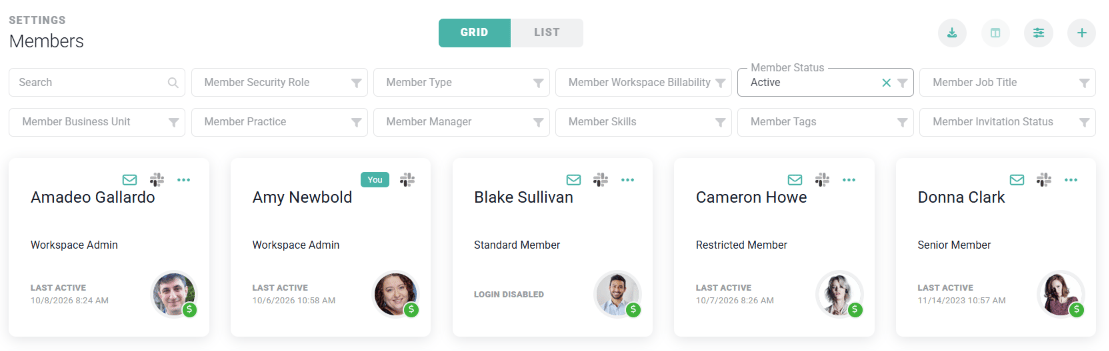
A workspace is an instance of Ruddr that contains members, clients, projects, time, expenses, and so forth. Anything a user does in Ruddr happens within the context of a workspace. You can create a new workspace by signing up for Ruddr, or join an existing workspace when a Workspace Admin invites you.You can be a member of multiple workspaces at the same time. You might be a member of your company’s workspace but then also maintain a personal workspace for your freelance work. You can quickly switch between workspaces to manage your tasks, time, expenses, etc. The information you create in one workspace is never visible in any other workspace.Join a workspaceTo join an existing Ruddr workspace, a Workspace Admin will need to invite you from the Members section of the Settings area (Figure 1). From there, the Workspace Admin can click the + (New Member) button, fill in your details, and check Send an email invitation to this member now to invite you into the workspace. See Accepting Workspace Invitations for what happens next.
Figure 1 - A Workspace Administrator can Click the + (New Member) Button to Invite a Member to Your Workspace
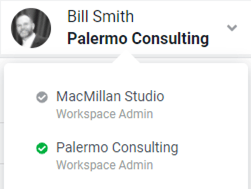
Create a workspaceTo create a new workspace, click the Start Trial button on the www.ruddr.io website and submit a new workspace request. Once our team validates your request, you will receive an email with a link to finalize your workspace. See Signing Up for Ruddr for the full process.When you finalize your workspace, you provide a company name, type of professional service, workspace name, and a unique Workspace URL ID. Ruddr suggests a workspace name and Workspace URL ID based on your company name. While your workspace name does not have to be unique, you cannot choose a Workspace URL ID that is already in use.Ruddr asks for the professional services type in order to create default values for various types of data entities (such as project types) within the workspace. You can always change this data once your workspace is created.Switch workspacesIf you are a member of multiple workspaces, you can switch between them from the user profile menu (Figure 2). Click your avatar at the top-right of the screen, then click the current workspace below My Profile to see a list of your other workspaces. Click any workspace to switch to it. To log in to a workspace that isn’t listed, click Log in to Another Workspace.
Figure 2 - Access Your Workspaces via the User Profile Menu
{"docsConfig":{"theme":"sequoia","$schema":"https://mintlify.com/docs.json","name":"Ruddr Help","colors":{"primary":"#00b2a9","light":"#80d8d4","dark":"#008983"},"logo":{"light":"https://mintcdn.com/ruddr-help/iPFSE7HQ1FIUVJiQ/logo/light.svg?fit=max\u0026auto=format\u0026n=iPFSE7HQ1FIUVJiQ\u0026q=85\u0026s=238c3e287f6fb7da539ab82a8299d222","dark":"https://mintcdn.com/ruddr-help/iPFSE7HQ1FIUVJiQ/logo/dark.svg?fit=max\u0026auto=format\u0026n=iPFSE7HQ1FIUVJiQ\u0026q=85\u0026s=d921de52360c0e369b1befbff62c7f9c"},"favicon":"https://mintcdn.com/ruddr-help/q6cE71SCxJ3VQnxR/favicon.svg?fit=max\u0026auto=format\u0026n=q6cE71SCxJ3VQnxR\u0026q=85\u0026s=b4315ec9ef2ded15eff422491b7eedf2","navbar":{"links":[{"href":"mailto:help@ruddr.io","label":"Support"}],"primary":{"type":"button","label":"Dashboard","href":"https://www.ruddr.io/app"}},"footer":{"socials":{"website":"https://ruddr.io","linkedin":"https://www.linkedin.com/company/ruddr","x":"https://twitter.com/RuddrHQ","youtube":"https://www.youtube.com/@Ruddr"},"links":[{"header":"Resources","items":[{"label":"Blog","href":"https://www.ruddr.com/blog"},{"label":"What's New","href":"https://www.ruddr.io/whats-new"},{"label":"System Status","href":"https://status.ruddr.io/"}]},{"header":"Company","items":[{"label":"About Ruddr","href":"https://www.ruddr.com/about-us"},{"label":"Careers","href":"https://www.ruddr.com/careers"},{"label":"Contact","href":"https://www.ruddr.com/contact"}]},{"header":"Legal","items":[{"label":"Trust Center","href":"https://trust.ruddr.com/"},{"label":"Privacy Policy","href":"https://www.ruddr.com/privacy-policy"},{"label":"Cookie Policy","href":"https://www.ruddr.com/cookie-policy"},{"label":"DPA","href":"https://www.ruddr.com/data-processing-addendum"}]}]},"styling":{"latex":false},"navigation":{"pages":[]}},"deployment":{"deploymentMetadataValue":{"subdomain":"ruddr-help","hasAudioNarration":false,"actualSubdomain":"ruddr-help","customDomains":["help.ruddr.io"],"gitSource":{"type":"github","owner":"ruddr-io","repo":"help","deployBranch":"master","contentDirectory":"","isPrivate":true,"mountPath":"","label":""},"chroma":{"liveDeploymentHistoryId":"6aeca20e8029e5fb8e3ee967","collectionId":"1abd10d6-0b07-4666-92d1-2650c1e98179","schemaVersion":"v3","latestBuiltDeploymentHistoryId":"6aeca20e8029e5fb8e3ee967"},"entitlements":{"AI_CHAT":{"status":"ENABLED"},"WEB_MCP":{"status":"ENABLED"},"NARRATION":{"status":"ENABLED"}},"buildId":"6aecffbe0bdbb1af4298e74b","clientVersion":"0.0.4074","searchFilterCounts":[{"language":"default","tag":"Product Guides","count":103},{"language":"default","tag":"FAQs \u0026 Troubleshooting","count":42},{"language":"default","tag":"FAQs and Troubleshooting","count":42},{"language":"default","tag":"Integrations","count":32},{"language":"default","tag":"Workspace Administration","count":32},{"language":"default","tag":"Projects","count":30},{"language":"default","tag":"Getting Started","count":22},{"language":"default","tag":"Time","count":13},{"language":"default","tag":"Expenses","count":11},{"language":"default","tag":"Reports","count":11}]},"assistantConfig":{"enableAskAiButton":false,"enableStarterQuestions":false,"enableContextualStarterQuestions":false,"enableAskAiSearchBar":true},"basePath":"","hasChatPermissions":true,"hasWebMcpPermissions":true,"toggles":[{"name":"kill-isr","enabled":true,"variant":{"name":"disabled","enabled":false,"feature_enabled":true},"impressionData":false},{"name":"agent-mintlify-slack","enabled":true,"variant":{"name":"disabled","enabled":false,"feature_enabled":true},"impressionData":false},{"name":"agent-integrations-settings","enabled":true,"variant":{"name":"disabled","enabled":false,"feature_enabled":true},"impressionData":false},{"name":"rbac-expansion","enabled":true,"variant":{"name":"disabled","enabled":false,"feature_enabled":true},"impressionData":false},{"name":"automations-pr-grouping","enabled":true,"variant":{"name":"disabled","enabled":false,"feature_enabled":true},"impressionData":false},{"name":"custom-prefix","enabled":true,"variant":{"name":"disabled","enabled":false,"feature_enabled":true},"impressionData":false},{"name":"analytics-v7","enabled":true,"variant":{"name":"disabled","enabled":false,"feature_enabled":true},"impressionData":false},{"name":"user-flows-analytics","enabled":true,"variant":{"name":"disabled","enabled":false,"feature_enabled":true},"impressionData":false},{"name":"no-publish-flow","enabled":true,"variant":{"name":"disabled","enabled":false,"feature_enabled":true},"impressionData":false},{"name":"workos-onboarding","enabled":true,"variant":{"name":"disabled","enabled":false,"feature_enabled":true},"impressionData":false},{"name":"llms-txt-v2","enabled":true,"variant":{"name":"disabled","enabled":false,"feature_enabled":true},"impressionData":false},{"name":"snapshot-serving-live","enabled":true,"variant":{"name":"disabled","enabled":false,"feature_enabled":true},"impressionData":false},{"name":"stripTemperatureMiddleware","enabled":true,"variant":{"name":"disabled","enabled":false,"feature_enabled":true},"impressionData":false},{"name":"support-platform-pylon-zendesk","enabled":true,"variant":{"name":"disabled","enabled":false,"feature_enabled":true},"impressionData":false},{"name":"snapshot-serving","enabled":true,"variant":{"name":"disabled","enabled":false,"feature_enabled":true},"impressionData":false},{"name":"instant-rollback","enabled":true,"variant":{"name":"disabled","enabled":false,"feature_enabled":true},"impressionData":false},{"name":"granular-notifications-server","enabled":true,"variant":{"name":"disabled","enabled":false,"feature_enabled":true},"impressionData":false},{"name":"granular-notifications","enabled":true,"variant":{"name":"disabled","enabled":false,"feature_enabled":true},"impressionData":false},{"name":"automations-fable","enabled":true,"variant":{"name":"disabled","enabled":false,"feature_enabled":true},"impressionData":false},{"name":"fixed-ai-action-pricing","enabled":true,"variant":{"name":"disabled","enabled":false,"feature_enabled":true},"impressionData":false},{"name":"automation-resolve-merge-conflict","enabled":true,"variant":{"name":"disabled","enabled":false,"feature_enabled":true},"impressionData":false},{"name":"scoped-publishing","enabled":true,"variant":{"name":"disabled","enabled":false,"feature_enabled":true},"impressionData":false},{"name":"mintql","enabled":true,"variant":{"name":"disabled","enabled":false,"feature_enabled":true},"impressionData":false},{"name":"page-level-analytics","enabled":true,"variant":{"name":"disabled","enabled":false,"feature_enabled":true},"impressionData":false},{"name":"editor-version-history-v2","enabled":true,"variant":{"name":"disabled","enabled":false,"feature_enabled":true},"impressionData":false},{"name":"billing-page-v2","enabled":true,"variant":{"name":"disabled","enabled":false,"feature_enabled":true},"impressionData":false},{"name":"full-page-search","enabled":true,"variant":{"name":"disabled","enabled":false,"feature_enabled":true},"impressionData":false},{"name":"workspace-projects","enabled":true,"variant":{"name":"disabled","enabled":false,"feature_enabled":true},"impressionData":false},{"name":"assistant-v5","enabled":true,"variant":{"name":"disabled","enabled":false,"feature_enabled":true},"impressionData":false},{"name":"fork-pr-previews","enabled":true,"variant":{"name":"disabled","enabled":false,"feature_enabled":true},"impressionData":false},{"name":"revalidation-jwt","enabled":true,"variant":{"name":"disabled","enabled":false,"feature_enabled":true},"impressionData":false},{"name":"vite-origin","enabled":true,"variant":{"name":"disabled","enabled":false,"feature_enabled":true},"impressionData":false},{"name":"workos-sso-scim","enabled":true,"variant":{"name":"disabled","enabled":false,"feature_enabled":true},"impressionData":false},{"name":"hobby-abuse-scan","enabled":true,"variant":{"name":"disabled","enabled":false,"feature_enabled":true},"impressionData":false},{"name":"dashboard-inbox","enabled":true,"variant":{"name":"disabled","enabled":false,"feature_enabled":true},"impressionData":false},{"name":"workos-signup","enabled":true,"variant":{"name":"disabled","enabled":false,"feature_enabled":true},"impressionData":false},{"name":"turbopuffer-dual-write","enabled":true,"variant":{"name":"disabled","enabled":false,"feature_enabled":true},"impressionData":false},{"name":"workos-enabled","enabled":true,"variant":{"name":"disabled","enabled":false,"feature_enabled":true},"impressionData":false},{"name":"approve-review-flow","enabled":true,"variant":{"name":"disabled","enabled":false,"feature_enabled":true},"impressionData":false},{"name":"sso-setup-deadline-banner","enabled":true,"variant":{"name":"disabled","enabled":false,"feature_enabled":true},"impressionData":false},{"name":"turbopuffer-serve","enabled":true,"variant":{"name":"disabled","enabled":false,"feature_enabled":true},"impressionData":false},{"name":"live-agents","enabled":true,"variant":{"name":"disabled","enabled":false,"feature_enabled":true},"impressionData":false},{"name":"comment-mode","enabled":true,"variant":{"name":"disabled","enabled":false,"feature_enabled":true},"impressionData":false}],"googleFontsInlined":false},"customCss":[],"page":{"pagePath":"getting-started/workspaces","slug":"/getting-started/workspaces","pageMetadata":{"title":"Workspaces","description":"Understand how Ruddr workspaces work and how to join, create, and switch between multiple workspaces.","href":"/getting-started/workspaces"},"description":{"compiledSource":"\"use strict\";\nconst {jsx: _jsx} = arguments[0];\nconst {useMDXComponents: _provideComponents} = arguments[0];\nfunction _createMdxContent(props) {\n const _components = {\n p: \"p\",\n ..._provideComponents(),\n ...props.components\n };\n return _jsx(_components.p, {\n children: \"Understand how Ruddr workspaces work and how to join, create, and switch between multiple workspaces.\"\n });\n}\nfunction MDXContent(props = {}) {\n const {wrapper: MDXLayout} = {\n ..._provideComponents(),\n ...props.components\n };\n return MDXLayout ? _jsx(MDXLayout, {\n ...props,\n children: _jsx(_createMdxContent, {\n ...props\n })\n }) : _createMdxContent(props);\n}\nreturn {\n default: MDXContent\n};\n","frontmatter":{},"scope":{}},"pageType":"default","mdx":{"mdxSource":{"compiledSource":"\"use strict\";const{Fragment:_Fragment,jsx:_jsx,jsxs:_jsxs}=arguments[0];const{useMDXComponents:_provideComponents}=arguments[0];function _createMdxContent(props){const _components={a:`a`,p:`p`,strong:`strong`,..._provideComponents(),...props.components},{Frame,OptimizedImage}=_components;if(!Frame)_missingMdxReference(`Frame`,true);if(!OptimizedImage)_missingMdxReference(`OptimizedImage`,true);return _jsxs(_Fragment,{children:[_jsx(_components.p,{children:`A workspace is an instance of Ruddr that contains members, clients, projects, time, expenses, and so forth. Anything a user does in Ruddr happens within the context of a workspace. You can create a new workspace by signing up for Ruddr, or join an existing workspace when a Workspace Admin invites you.`}),`\n`,_jsx(_components.p,{children:`You can be a member of multiple workspaces at the same time. You might be a member of your company’s workspace but then also maintain a personal workspace for your freelance work. You can quickly switch between workspaces to manage your tasks, time, expenses, etc. The information you create in one workspace is never visible in any other workspace.`}),`\n`,_jsx(_components.p,{children:_jsx(_components.strong,{children:`Join a workspace`})}),`\n`,_jsxs(_components.p,{children:[`To join an existing Ruddr workspace, a Workspace Admin will need to invite you from the `,_jsx(_components.strong,{children:`Members`}),` section of the `,_jsx(_components.strong,{children:`Settings`}),` area (Figure 1). From there, the Workspace Admin can click the `,_jsx(_components.strong,{children:`+`}),` (`,_jsx(_components.strong,{children:`New Member`}),`) button, fill in your details, and check `,_jsx(_components.strong,{children:`Send an email invitation to this member now`}),` to invite you into the workspace. See `,_jsx(_components.a,{href:`/getting-started/accepting-workspace-invitations`,children:`Accepting Workspace Invitations`}),` for what happens next.`]}),`\n`,_jsx(Frame,{caption:`Figure 1 - A Workspace Administrator can Click the **+** (**New Member**) Button to Invite a Member to Your Workspace`,children:_jsx(OptimizedImage,{src:`https://mintcdn.com/ruddr-help/RQ-bG-NL7YdCUst0/images/workspaces-1.png?fit=max\u0026auto=format\u0026n=RQ-bG-NL7YdCUst0\u0026q=85\u0026s=ffe8ebd977aa631a8b74a12affd930cf`,alt:`A Workspace Administrator can Click the New Member Button to Invite a Member to Your Workspace`,\"data-og-width\":`1109`,width:`1109`,\"data-og-height\":`351`,height:`351`,\"data-path\":`images/workspaces-1.png`,\"data-optimize\":`true`,\"data-opv\":`3`,srcset:`https://mintcdn.com/ruddr-help/RQ-bG-NL7YdCUst0/images/workspaces-1.png?w=280\u0026fit=max\u0026auto=format\u0026n=RQ-bG-NL7YdCUst0\u0026q=85\u0026s=727d0a313800710aacd520e4baec9299 280w, https://mintcdn.com/ruddr-help/RQ-bG-NL7YdCUst0/images/workspaces-1.png?w=560\u0026fit=max\u0026auto=format\u0026n=RQ-bG-NL7YdCUst0\u0026q=85\u0026s=678413c561398bc7772a84d6189d48a7 560w, https://mintcdn.com/ruddr-help/RQ-bG-NL7YdCUst0/images/workspaces-1.png?w=840\u0026fit=max\u0026auto=format\u0026n=RQ-bG-NL7YdCUst0\u0026q=85\u0026s=b98feaa0ae96487aaf09c63662b7f01c 840w, https://mintcdn.com/ruddr-help/RQ-bG-NL7YdCUst0/images/workspaces-1.png?w=1100\u0026fit=max\u0026auto=format\u0026n=RQ-bG-NL7YdCUst0\u0026q=85\u0026s=46ee5fe9142d605406f66c7010a1ef85 1100w, https://mintcdn.com/ruddr-help/RQ-bG-NL7YdCUst0/images/workspaces-1.png?w=1650\u0026fit=max\u0026auto=format\u0026n=RQ-bG-NL7YdCUst0\u0026q=85\u0026s=838b833f71b396a352944ea2d59e636d 1650w, https://mintcdn.com/ruddr-help/RQ-bG-NL7YdCUst0/images/workspaces-1.png?w=2500\u0026fit=max\u0026auto=format\u0026n=RQ-bG-NL7YdCUst0\u0026q=85\u0026s=4671df322cdd58749e261ab52f5e3b0c 2500w`})}),`\n`,_jsx(_components.p,{children:_jsx(_components.strong,{children:`Create a workspace`})}),`\n`,_jsxs(_components.p,{children:[`To create a new workspace, click the `,_jsx(_components.strong,{children:`Start Trial`}),` button on the `,_jsx(_components.a,{href:`https://www.ruddr.io`,children:`www.ruddr.io`}),` website and submit a new workspace request. Once our team validates your request, you will receive an email with a link to finalize your workspace. See `,_jsx(_components.a,{href:`/getting-started/signing-up-for-ruddr`,children:`Signing Up for Ruddr`}),` for the full process.`]}),`\n`,_jsx(_components.p,{children:`When you finalize your workspace, you provide a company name, type of professional service, workspace name, and a unique Workspace URL ID. Ruddr suggests a workspace name and Workspace URL ID based on your company name. While your workspace name does not have to be unique, you cannot choose a Workspace URL ID that is already in use.`}),`\n`,_jsx(_components.p,{children:`Ruddr asks for the professional services type in order to create default values for various types of data entities (such as project types) within the workspace. You can always change this data once your workspace is created.`}),`\n`,_jsx(_components.p,{children:_jsx(_components.strong,{children:`Switch workspaces`})}),`\n`,_jsxs(_components.p,{children:[`If you are a member of multiple workspaces, you can switch between them from the user profile menu (Figure 2). Click your avatar at the top-right of the screen, then click the current workspace below `,_jsx(_components.strong,{children:`My Profile`}),` to see a list of your other workspaces. Click any workspace to switch to it. To log in to a workspace that isn’t listed, click `,_jsx(_components.strong,{children:`Log in to Another Workspace`}),`.`]}),`\n`,_jsx(Frame,{caption:`Figure 2 - Access Your Workspaces via the User Profile Menu`,children:_jsx(OptimizedImage,{src:`https://mintcdn.com/ruddr-help/RQ-bG-NL7YdCUst0/images/workspaces-2.png?fit=max\u0026auto=format\u0026n=RQ-bG-NL7YdCUst0\u0026q=85\u0026s=453fd5220b2849880276893aacc40dd4`,alt:`Access Your Workspaces via the User Profile Menu`,\"data-og-width\":`251`,width:`251`,\"data-og-height\":`189`,height:`189`,\"data-path\":`images/workspaces-2.png`,\"data-optimize\":`true`,\"data-opv\":`3`,srcset:`https://mintcdn.com/ruddr-help/RQ-bG-NL7YdCUst0/images/workspaces-2.png?w=280\u0026fit=max\u0026auto=format\u0026n=RQ-bG-NL7YdCUst0\u0026q=85\u0026s=14da5e89d33229d226e4906eee3dd446 280w, https://mintcdn.com/ruddr-help/RQ-bG-NL7YdCUst0/images/workspaces-2.png?w=560\u0026fit=max\u0026auto=format\u0026n=RQ-bG-NL7YdCUst0\u0026q=85\u0026s=03ec6d3e91e43bdb4f2dda5df10dbbcf 560w, https://mintcdn.com/ruddr-help/RQ-bG-NL7YdCUst0/images/workspaces-2.png?w=840\u0026fit=max\u0026auto=format\u0026n=RQ-bG-NL7YdCUst0\u0026q=85\u0026s=47ebb8b63eb77bac4161cfd5300171a4 840w, https://mintcdn.com/ruddr-help/RQ-bG-NL7YdCUst0/images/workspaces-2.png?w=1100\u0026fit=max\u0026auto=format\u0026n=RQ-bG-NL7YdCUst0\u0026q=85\u0026s=8778dac23714d86ae0547d74625e0307 1100w, https://mintcdn.com/ruddr-help/RQ-bG-NL7YdCUst0/images/workspaces-2.png?w=1650\u0026fit=max\u0026auto=format\u0026n=RQ-bG-NL7YdCUst0\u0026q=85\u0026s=45038685528a91c8155526645bd055f1 1650w, https://mintcdn.com/ruddr-help/RQ-bG-NL7YdCUst0/images/workspaces-2.png?w=2500\u0026fit=max\u0026auto=format\u0026n=RQ-bG-NL7YdCUst0\u0026q=85\u0026s=6605b108dac286197d43f125d15979de 2500w`})})]})}function MDXContent(props={}){const{wrapper:MDXLayout}={..._provideComponents(),...props.components};return MDXLayout?_jsx(MDXLayout,{...props,children:_jsx(_createMdxContent,{...props})}):_createMdxContent(props)}return{default:MDXContent};function _missingMdxReference(id,component){throw new Error(`Expected `+(component?`component`:`object`)+\" `\"+id+\"` to be defined: you likely forgot to import, pass, or provide it.\")}","frontmatter":{},"scope":{"config":{},"pageMetadata":{"title":"Workspaces","description":"Understand how Ruddr workspaces work and how to join, create, and switch between multiple workspaces.","href":"/getting-started/workspaces"}}},"mdxSourceWithNoJs":null},"mdxExtracts":{"tableOfContents":[],"codeExamples":{}},"jsLinks":[],"subdomain":"ruddr-help","siteName":"Ruddr Help","title":"Workspaces - Ruddr Help","navMaps":{"firstHrefInVersion":{},"firstHrefInLanguage":{}},"lastModified":"2026-10-08T14:07:00.087Z","originalFileLocation":"getting-started/workspaces.mdx"},"headHtml":"\u003cscript data-mint-head>(function(){var d=document.documentElement,p=null;if(!p){try{p=localStorage.getItem(\"isDarkMode\")}catch(e){}if(p==='true')p='dark';else if(p==='false')p='light';if(p!=='light'\u0026\u0026p!=='dark'\u0026\u0026p!=='system')p=\"system\"}var r=p==='system'?(matchMedia(\"(prefers-color-scheme: dark)\").matches?'dark':'light'):p;d.classList.remove(r==='dark'?'light':'dark');d.classList.add(r);d.setAttribute(\"data-theme-preference\",p)})();\u003c/script>\u003cmeta data-mint-head name=\"description\" content=\"Understand how Ruddr workspaces work and how to join, create, and switch between multiple workspaces.\">\u003cmeta data-mint-head name=\"application-name\" content=\"Ruddr Help\">\u003cmeta data-mint-head name=\"generator\" content=\"Mintlify\">\u003clink data-mint-head rel=\"icon\" type=\"image/png\" sizes=\"192x192\" href=\"/mintlify-assets/_mintlify/favicons/ruddr-help/JjhSNq1fJW5JsXzY/_generated/favicon/android-chrome-192x192.png\" media=\"(prefers-color-scheme: light)\">\u003clink data-mint-head rel=\"apple-touch-icon\" type=\"image/png\" sizes=\"180x180\" href=\"/mintlify-assets/_mintlify/favicons/ruddr-help/JjhSNq1fJW5JsXzY/_generated/favicon/apple-touch-icon.png\">\u003clink data-mint-head rel=\"icon\" type=\"image/png\" sizes=\"16x16\" href=\"/mintlify-assets/_mintlify/favicons/ruddr-help/JjhSNq1fJW5JsXzY/_generated/favicon/favicon-16x16.png\" media=\"(prefers-color-scheme: light)\">\u003clink data-mint-head rel=\"icon\" type=\"image/png\" sizes=\"32x32\" href=\"/mintlify-assets/_mintlify/favicons/ruddr-help/JjhSNq1fJW5JsXzY/_generated/favicon/favicon-32x32.png\" media=\"(prefers-color-scheme: light)\">\u003clink data-mint-head rel=\"shortcut icon\" type=\"image/x-icon\" href=\"/mintlify-assets/_mintlify/favicons/ruddr-help/JjhSNq1fJW5JsXzY/_generated/favicon/favicon.ico\" media=\"(prefers-color-scheme: light)\">\u003clink data-mint-head rel=\"icon\" type=\"image/png\" sizes=\"192x192\" href=\"/mintlify-assets/_mintlify/favicons/ruddr-help/JjhSNq1fJW5JsXzY/_generated/favicon-dark/android-chrome-192x192.png\" media=\"(prefers-color-scheme: dark)\">\u003clink data-mint-head rel=\"icon\" type=\"image/png\" sizes=\"16x16\" href=\"/mintlify-assets/_mintlify/favicons/ruddr-help/JjhSNq1fJW5JsXzY/_generated/favicon-dark/favicon-16x16.png\" media=\"(prefers-color-scheme: dark)\">\u003clink data-mint-head rel=\"icon\" type=\"image/png\" sizes=\"32x32\" href=\"/mintlify-assets/_mintlify/favicons/ruddr-help/JjhSNq1fJW5JsXzY/_generated/favicon-dark/favicon-32x32.png\" media=\"(prefers-color-scheme: dark)\">\u003clink data-mint-head rel=\"shortcut icon\" type=\"image/x-icon\" href=\"/mintlify-assets/_mintlify/favicons/ruddr-help/JjhSNq1fJW5JsXzY/_generated/favicon-dark/favicon.ico\" media=\"(prefers-color-scheme: dark)\">\u003cmeta data-mint-head property=\"og:title\" content=\"Workspaces - Ruddr Help\">\u003cmeta data-mint-head property=\"og:description\" content=\"Understand how Ruddr workspaces work and how to join, create, and switch between multiple workspaces.\">\u003cmeta data-mint-head property=\"og:site_name\" content=\"Ruddr Help\">\u003cmeta data-mint-head property=\"og:url\" content=\"https://help.ruddr.io/getting-started/workspaces\">\u003cmeta data-mint-head property=\"og:type\" content=\"website\">\u003cmeta data-mint-head property=\"og:image\" content=\"https://ruddr-help.mintlify.site/_mintlify/api/og/v2?division=Getting+Started\u0026amp;title=Workspaces\u0026amp;description=Understand+how+Ruddr+workspaces+work+and+how+to+join%2C+create%2C+and+switch+between+multiple+workspaces.\u0026amp;theme=0cc3bee754e1eace3d2f4a0c\u0026amp;signature=ac22385ac84ecadb3b0ad141800ce748feaea25f03471804b19e6cbc491ea700\">\u003cmeta data-mint-head property=\"og:image:width\" content=\"1200\">\u003cmeta data-mint-head property=\"og:image:height\" content=\"630\">\u003cmeta data-mint-head name=\"twitter:card\" content=\"summary_large_image\">\u003cmeta data-mint-head name=\"twitter:title\" content=\"Workspaces - Ruddr Help\">\u003cmeta data-mint-head name=\"twitter:description\" content=\"Understand how Ruddr workspaces work and how to join, create, and switch between multiple workspaces.\">\u003cmeta data-mint-head name=\"twitter:image\" content=\"https://ruddr-help.mintlify.site/_mintlify/api/og/v2?division=Getting+Started\u0026amp;title=Workspaces\u0026amp;description=Understand+how+Ruddr+workspaces+work+and+how+to+join%2C+create%2C+and+switch+between+multiple+workspaces.\u0026amp;theme=0cc3bee754e1eace3d2f4a0c\u0026amp;signature=ac22385ac84ecadb3b0ad141800ce748feaea25f03471804b19e6cbc491ea700\">\u003cmeta data-mint-head name=\"twitter:image:width\" content=\"1200\">\u003cmeta data-mint-head name=\"twitter:image:height\" content=\"630\">\u003cmeta data-mint-head name=\"msapplication-config\" content=\"/mintlify-assets/_mintlify/favicons/ruddr-help/JjhSNq1fJW5JsXzY/_generated/favicon/browserconfig.xml\">\u003cmeta data-mint-head name=\"apple-mobile-web-app-title\" content=\"Ruddr Help\">\u003cmeta data-mint-head name=\"msapplication-TileColor\" content=\"#00b2a9\">\u003clink data-mint-head rel=\"canonical\" href=\"https://help.ruddr.io/getting-started/workspaces\">\u003clink data-mint-head rel=\"alternate\" type=\"application/xml\" href=\"/sitemap.xml\">\u003clink data-mint-head rel=\"alternate\" type=\"text/markdown\" href=\"/getting-started/workspaces.md\">\u003cscript data-mint-head type=\"application/ld+json\">{\"@context\":\"https://schema.org\",\"@graph\":[{\"@type\":\"Organization\",\"@id\":\"https://help.ruddr.io/#organization\",\"name\":\"Ruddr Help\",\"url\":\"https://help.ruddr.io\",\"logo\":{\"@type\":\"ImageObject\",\"url\":\"https://mintcdn.com/ruddr-help/iPFSE7HQ1FIUVJiQ/logo/light.svg?fit=max\u0026auto=format\u0026n=iPFSE7HQ1FIUVJiQ\u0026q=85\u0026s=238c3e287f6fb7da539ab82a8299d222\"}},{\"@type\":\"WebSite\",\"@id\":\"https://help.ruddr.io#website\",\"name\":\"Ruddr Help\",\"url\":\"https://help.ruddr.io\",\"publisher\":{\"@id\":\"https://help.ruddr.io/#organization\"}},{\"@type\":\"WebPage\",\"@id\":\"https://help.ruddr.io/getting-started/workspaces#webpage\",\"url\":\"https://help.ruddr.io/getting-started/workspaces\",\"name\":\"Workspaces\",\"description\":\"Understand how Ruddr workspaces work and how to join, create, and switch between multiple workspaces.\",\"dateModified\":\"2026-10-08T14:07:00.087Z\",\"isPartOf\":{\"@id\":\"https://help.ruddr.io#website\"},\"breadcrumb\":{\"@id\":\"https://help.ruddr.io/getting-started/workspaces#breadcrumb\"}},{\"@type\":\"BreadcrumbList\",\"@id\":\"https://help.ruddr.io/getting-started/workspaces#breadcrumb\",\"itemListElement\":[{\"@type\":\"ListItem\",\"position\":1,\"name\":\"Getting Started\",\"item\":\"https://help.ruddr.io/getting-started/introduction-to-ruddr\"},{\"@type\":\"ListItem\",\"position\":2,\"name\":\"Workspaces\",\"item\":\"https://help.ruddr.io/getting-started/workspaces\"}]},{\"@type\":[\"Article\",\"TechArticle\"],\"@id\":\"https://help.ruddr.io/getting-started/workspaces#article\",\"headline\":\"Workspaces\",\"name\":\"Workspaces\",\"description\":\"Understand how Ruddr workspaces work and how to join, create, and switch between multiple workspaces.\",\"url\":\"https://help.ruddr.io/getting-started/workspaces\",\"mainEntityOfPage\":{\"@id\":\"https://help.ruddr.io/getting-started/workspaces#webpage\"},\"dateModified\":\"2026-10-08T14:07:00.087Z\",\"publisher\":{\"@id\":\"https://help.ruddr.io/#organization\"},\"isPartOf\":{\"@id\":\"https://help.ruddr.io#website\"}}]}\u003c/script>\u003cscript data-mint-head type=\"application/ld+json\">{\"@context\":\"https://schema.org\",\"@type\":\"WebSite\",\"name\":\"Ruddr Help\",\"creator\":{\"@type\":\"Organization\",\"name\":\"Mintlify\",\"url\":\"https://mintlify.com\"}}\u003c/script>","siteName":"Ruddr Help","nav":{"global":null,"tabs":[{"tab":"Getting Started","icon":"rocket","groups":[{"group":"Getting Started","pages":[{"title":"Introduction to Ruddr","href":"/getting-started/introduction-to-ruddr"},{"title":"Overview of Professional Services Automation","href":"/getting-started/overview-of-professional-services-automation"},{"title":"Glossary of Terms","href":"/getting-started/glossary-of-terms"},{"title":"Signing Up for Ruddr","href":"/getting-started/signing-up-for-ruddr"},{"title":"Accepting Workspace Invitations","href":"/getting-started/accepting-workspace-invitations"},{"title":"Logging In","description":"Learn how to log into Ruddr with one or multiple workspaces, retrieve a forgotten Workspace URL ID, and reset your password.","href":"/getting-started/logging-in"},{"title":"Workspaces","href":"/getting-started/workspaces"},{"title":"Navigating the Ruddr Interface","description":"A tour of the Ruddr interface, including the header bar, workspace search, help and support options, the timer, and the collapsible nav bar.","href":"/getting-started/navigating-the-ruddr-interface"},{"title":"Ruddr Assistant","href":"/getting-started/ruddr-assistant"},{"title":"The Home Area","href":"/getting-started/the-home-area"},{"title":"Your User Profile","href":"/getting-started/user-profile"}]}]},{"tab":"Setup Guide","icon":"compass","pages":[{"title":"Setup Guide","href":"/setup-guide/introduction"}]},{"tab":"Workspace Administration","icon":"gear","pages":[{"title":"Workspace Administration","href":"/workspace-administration/managing-your-workspace"}]},{"tab":"Product Guides","icon":"book-open","pages":[{"title":"Product Guides","href":"/pipeline/contacts-list"}]},{"tab":"Integrations","icon":"plug","pages":[{"title":"Integrations","href":"/integrations/ai-connectors-overview"}]},{"tab":"FAQs \u0026 Troubleshooting","icon":"circle-question","pages":[{"title":"FAQs \u0026 Troubleshooting","href":"/faqs-and-troubleshooting/general/why-am-i-unable-to-login-to-ruddr"}]},{"tab":"API Docs","icon":"code","align":"end","href":"https://docs.ruddr.io"}]},"basePath":"","title":"Workspaces - Ruddr Help","buildId":"dpl_BLQvU86QFwq3AhPofSTw6q8dGWKm","deploymentId":"dpl_BLQvU86QFwq3AhPofSTw6q8dGWKm","dynamics":["07c022d89b","a74be98ba7","a9bb46feb3"],"chunks":["Frame-CK6QbnxT.js","DynamicMarkdown-BKiHAm_d.js","zoom-image-lightbox-CLQdF-Ar.js","lightbox-handle-r17bVUz3.js","Markdown-CpxgzsKA.js","clsx-C5EfhVm0.js","lib-DuNMoZ05.js","lib-B8HbPgcC.js","html-void-elements-mCSPHezU.js","dist-CJ9Oly2E.js","katex-YMM-FMeD.js","marked.esm-CZWythHk.js","AssistantPageLink-Mk6P3qvh.js"]}